Open the MyHooks Visual Studio Solution in Visual Studio. A shortcut to the solution is located under Start -> All Programs -> DatStat Illume -> DatStat Illume 4.5 SDK -> Runtime SDK Examples, or you can double-click on the file located in "C:\Program Files\DatStat\DatStat Illume 4.5 SDK\RuntimeSDKExamples\RuntimeSDKExamples.sln". In this solution you will see one project with three four files implementing each of the four different kinds of hooks.
- MyAuthenticate.cs defines class MyAuthenticate which implements the interface IDatStatPreAuthenticate corresponding to the hook type or 'hookid' of "Pre-Authenticate".
- MyPostBack.cs defines class MyPostBack which implements the interface IDatStatPostBack corresponding to the hook type "Post-Back".
- MyRuntimeContent.cs defines two classes; MyRuntimeContent and MyRuntimeContent2 which implement the interface IDatStatRuntimeContent corresponding to the hook type "Runtime-Content".
- The fourth file, MyFeedback.cs defines class MyFeedback which implements the interfaces IDatStatRuntimeContent and IDatStatSubmit corresponding to the hook types "Runtime-Content" and "Submit".
The Visual Studio solution "RuntimeSDKExamples.sln" contains a reference to the DatStat Illume Collector DLL (Collector.dll) which comes with the DatStat Illume Designer client. Initially this reference points to "C:\Program Files\DatStat\DatStat Illume 4.5 SDK\SDK Assemblies\bin\Collector.dll". If you installed the DatStat Illume SDK in a location other than the default, you will have to change the reference accordingly. You can also simply copy the file Collector.dll from the location of the client software to some other location and point the reference there instead.
Open each source file and place a break-point in each method defined for each class (there is only one per class except for MyFeedback.cs which contains two).
Launch the Illume Designer 4.5 executable and select "Work Locally" rather than logging-in to your Illume Server. Switch back over to Visual Studio and select the menu item Debug/Processes. You will be presented with the Processes dialog (see Figure 1). Find the Illume.exe process in the list of Available Processes and then click "Attach".
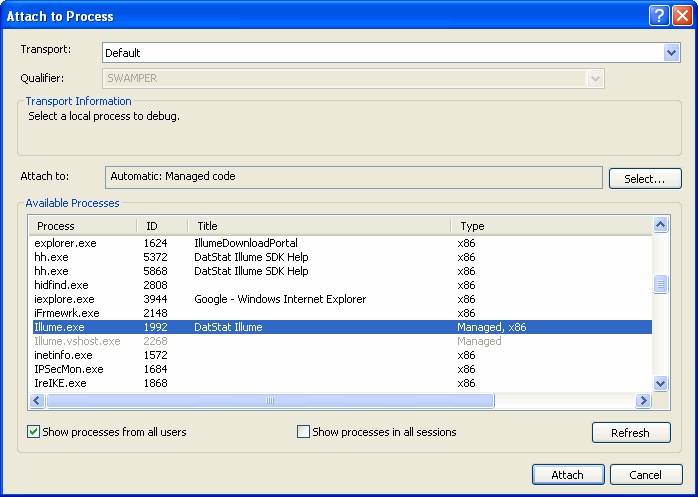
Figure 1
You are now ready to step through the hook implementations in the RuntimeSDKExamples solution. Switch back to the Illume Designer and open the survey named "SDK40HookSamples" which you added to your survey cache. In the Survey Editor, select "Preview Survey" from the "File" menu, or click the preview toolbar button. Go through the survey and see how your breakpoints in visual studio occur. This will give you a feel for what can be accomplished with DatStat Illume SDK Hooks.
Once you are comfortable with these examples you can create your own hooks to do what your specific needs dictate.
Next; Adding and Managing Survey Hooks