Illume surveys include three events to which you can attach custom code. You can attach several functions to each of these hooks, and Illume will call them in the order you specify:
- The PreAuthenticate event. This event occurs only once: before Illume validates a participant's login credentials. A common use for custom code attached to the PreAuthenticate event is to call out to an external database to store or retrieve information about the participant who is attempting to log in.
- The Postback event. This event occurs every time a participant moves from one page to another.
- The Submit event. This event occurs only once: when a participant submits a survey. Illume executes any code attached to the Submit event when the participant clicks the submit button.
In addition to these event hooks, Illume includes an object hook called RuntimeContent that can be placed anywhere in the survey. Whenever Illume encounters a RuntimeContent hook, it executes whatever code you have associated with the hook.
For example, to execute a custom function after a participant answers question number 10, simply create a RuntimeContent object in the survey and drag it into position immediately below question #10 in the survey designer.
The survey designer includes a point-and-click interface to select the DLLs containing the code to be executed in the RuntimeContent object.
The RuntimeContent hook differs from the three event-based hooks in the following ways:
- RuntimeContent hooks can be placed anywhere within a survey, and can be moved by dragging and dropping.
- RuntimeContent hooks are executed only as they are encountered, not at pre-determined times like the event hooks.
- RuntimeContent hooks can return text content, including HTML and JavaScript, to appear in your survey. The content will appear wherever you put the hook. (E.g. If the hook comes immediately after question #10, the HTML returned by the hook will appear immediately after question #10.)
- You can include multiple RuntimeContent hooks in your survey.
- RuntimeContent hooks include conditional execution: the code associated with each hook can be executed or ignored based on data that the survey has collected so far.
The DatStat collector engine provides the ability for survey designers to perform custom functionality during the run of a survey via the use of Runtime Hooks. These hooks are developed using the .NET Framework in any of the .NET supported languages (e.g. C#, Visual Basic, etc). The following diagram demonstrates the lifetime of a survey at runtime and where the four supported hook types come into play:
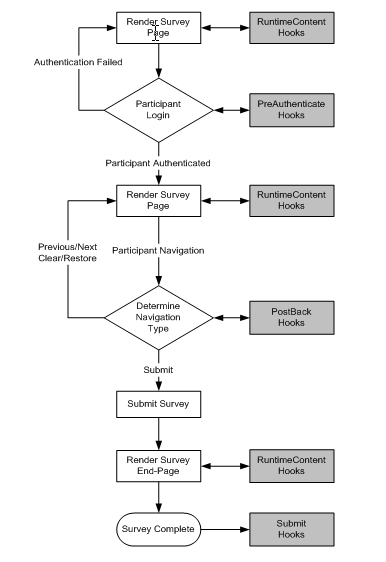
Figure 1
With respect to Figure 1 above, runtime hooks will be called if they exist in the survey at pre-determined points during the survey runtime. Some hooks provide content to the survey to be displayed on the survey page (e.g. RuntimeContent) while others are simply a means to perform work at key points during the survey runtime (e.g. PreAuthenticate, PostBack, and Submit).
The hook developer will implement a type of hook by writing a .NET class which implements the correct interface for that hook type. For example, to write a hook class that will be called for PostBack, the class must implement the interface DatStat.Collector.IDatStatPostBack for the hook to be called successfully.
The following list of hook types and interfaces are currently implemented:
| Hook Type ID | Interface to Implement |
|---|---|
| PreAuthenticate | DatStat.Collector.IDatStatPreAuthenticate |
| RuntimeContent | DatStat.Collector.IDatStatRuntimeContent |
| PostBack | DatStat.Collector.IDatStatPostBack |
| Submit | DatStat.Collector.IDatStatSubmit |
All hook interfaces will require the creation of a single method that takes as its only argument a hook context of type DatStat.Collector.HookContext. This context can be used by the hook developer to interact with the DatStat Illume Collector runtime as described below. The following is a sample code snippet which implements an EndPageContent hook in C#. Note that Visual Basic can also be used with .NET and that all hook interfaces and objects are available in the DatStat.Collector namespace.
namespace DatStat.MyHooks
{
    public class MyFeedback : DatStat.Collector.IDatStatRuntimeContent
    {
        public MyFeedback(){}

        public string RuntimeContent_Hook(DatStat.Collector.HookContext ctx)
        {
            return(“You are finished with the survey!!!”);
        }

    }
}
Note that the class implements the required IDatStatRuntimeContent interface which dictates that the method with the signature public string RuntimeContent_Hook(DatStat.Collector.HookContext ctx) exists. The following table summarizes the currently available hook interfaces and the method implementation required by them.
| Interface to Implement | Interface Method |
|---|---|
| IDatStatPreAuthenticate | public string PreAuthenticate_Hook(HookContext ctx) |
| IDatStatRuntimeContent | public string RuntimeContent_Hook(HookContext ctx) |
| IDatStatPostBack | public bool PostBack_Hook(HookContext ctx) |
| IDatStatSubmit | public void Submit_Hook(HookContext ctx) |
It is possible to have multiple hooks of type "PreAuthenticate", "PostBack", and "Submit" specified within a survey. If this is the case, the hooks of the same type will be called in the order in which they appear in the list of survey hooks. Hooks of type "RuntimeContent" are always called when a survey "Runtime Content" object is encountered during survey processing.
Next: HookContext Object Overview